Thanks for your overwhelming response on using M2 Plugin. So now i have come up with a few new improvements in this plugin. so lets go tho what are new changes without wasting any time.
1) Improving performance while displaying on excel. so i have removed the formatting which was done while displaying values. so now you will not have to wait too long till it completes displaying data into excel.
2) Export of CM and FO bhav copy
As last time i have put that in beta for exporting CM, FO bhav copy. now i have completed my pending task for that and now it is compatible to amibroker format.
Format for CM in csv
Ticker, date, open, high, low, close, volume
In CM export you will get data only of the stock and not other details which are there in bahvcopy so what you see in excel will be more data than what will be exported.
Format for FO
Ticker, date, open, high, low, close, volume, OI
In FO export you will receive for now only export of future contracts. I am not exporting options contracts for now. if you guys feel that we should add options also then will try to add it in next versions.
3) Options Pay of Graph
This is very important and simple to use feature. It is option payoff calculator/ graph.
Here you select your expected Strikes from Call/Put with either long for short.
And specify the strike interval for the script . Ex Nifty currently strike interval is 50. same way for different stocks strike interval is different. so you have to specify it manually when using it.
for details on how to use you can check my youtube video link.
4) Automated Option Strategy Calculator.
This is very import feature and personally i have put a lot of effort on this. Here you just select the option chain as you use to specify before.
And it will calculate a list of all this Strategy for now and display you the risk-reward and payoff graph. For more details on how to use check the youtube video.
Thanks for your overwellming response to this plugin. I have got many repsonses that it has help people. But few are facing security warning. so i am writting this post for them .
If you
1) Right click on setup.exe
2) Select properties then the Digital Signatures tab
3) Select Certificate from list of certificates
4) Click on details
5) Click on View Certificate
6) Install Certificate
7) Select Store location to Local Machine
8) Manually select location for certificate by click on Browse
Trusted Root Certificate Authorities
9) Click next and finish It will install certificate in your system
After this you can again try running Setup. it will work .
I have came up with an excel plugin to download and display bhavcopy for Cash & FO, Delivery report for Cashe and Option Chain display in excel via a sigle button click Plugin
You can install the plugin from the above source. Once you download the zip file extract to a folder
and click on setup it will complete the installation.
A video having more explanation of how to use it.
After installation open excel you will be able to see an menu option named "M2 Plugin" as show in the below image.
You can click on below mentioned options for getting relevant data.
1) Get Option Chain
It will display and Form for specifying the url for Nse option chain. By default it will take current expiry option chain of nifty.
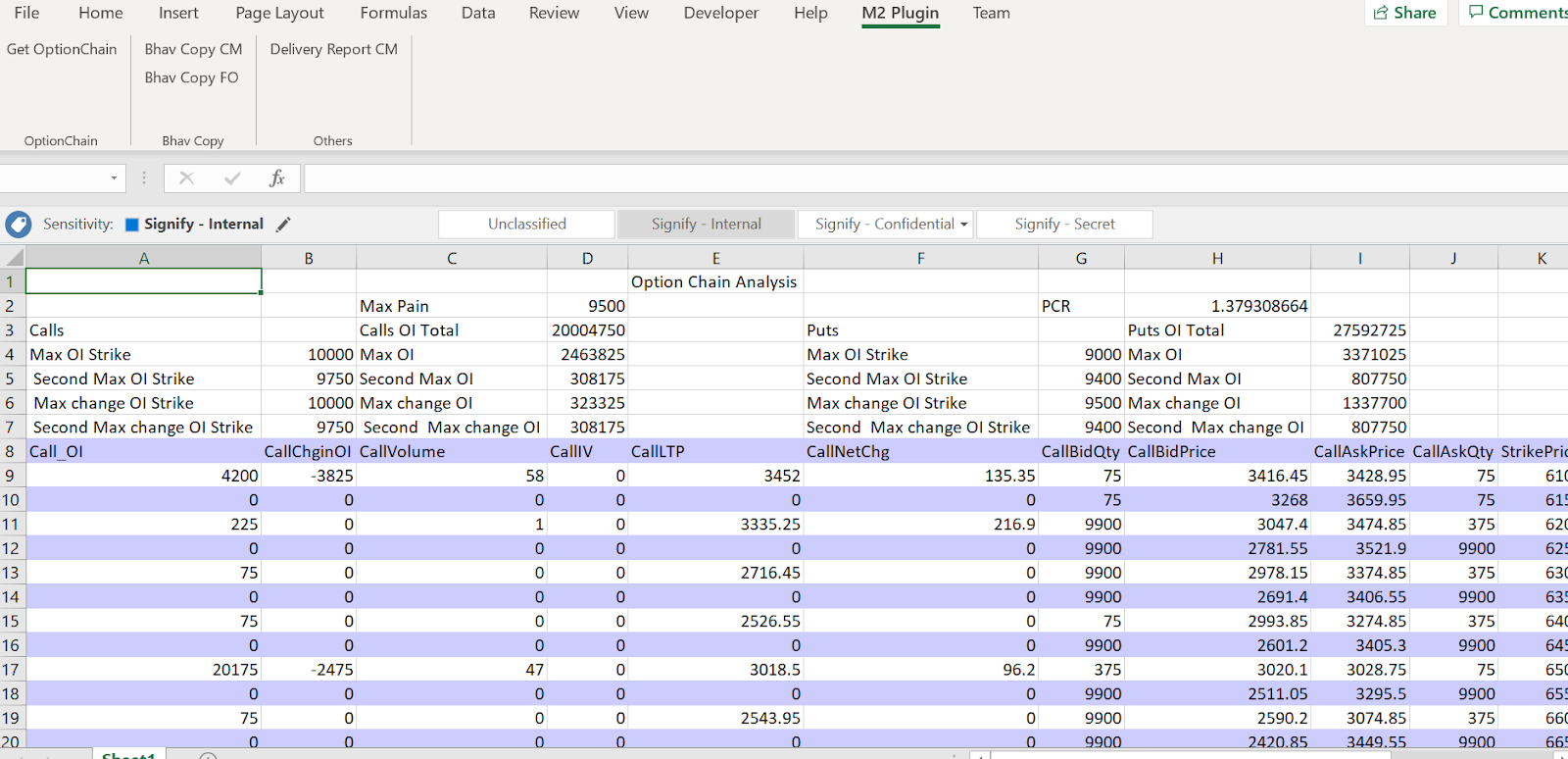
Once you click on ok it will parse the Nse option chain and display in the excel as show in below image.
It will also calcuate max pain, PCR and highest OI at which call & put strike is available.
2) Get Bhav Copy CM
On click of this button it will display an form which will ask for the date for which bhavcopy is to be downloaded. On selection of correct date it will dowload the bhav copy and display it in excel.
Do remeber for current date bhavcopy is uploaded by exchange after 4:30 PM but many a time they delay in uploading the bhavcopy.
3) Get Bhav Copy FO
On click of this button it will display an form which will ask for the date for which bhavcopy is to be downloaded. On selection of correct date it will dowload the bhav copy for Futures and display it in excel. It will take a minute or show once it starts displaing in excel as data will be huge.
4) Delivery Report CM
On Click of this button it will display an form which will ask for the date for which delivery report is to be downloaded. On selection of correct date it will download the delivery report and display it in excel.
This is a very basic tutorial on displaying how to parse nse option chain in C# using html agility utility.
If you guys are not aware about nse option chain. It is a table structure displaying details about call and put on NSE Index or any NSE FNO stock.
Its most important component is OI and IV for particualr Option. along with Option Price.
it helps you in identifying your trade stratagy either you have a mean reverting stratagy or a trend folow stratagy. It will help you in identifying it and also help you in predicting stoploss levels.
Through option chain two most calculations people derive is PCR ratio and Max Pain.
PCR Ratio is a ratio of call to put postitions in the market.
Max Pain is the strike price at which sellers or call and put will have the most impact.
So now going to Parsing it with Html Agility pack and displaying it on a Data grid.
HttpClientHandler handler = new HttpClientHandler();
handler.AutomaticDecompression = System.Net.DecompressionMethods.GZip | DecompressionMethods.Deflate;
System.Net.Http.HttpClient client = new System.Net.Http.HttpClient(handler);
System.Net.Http.HttpRequestMessage requestMessage = new System.Net.Http.HttpRequestMessage();
requestMessage.RequestUri = new Uri(url);
requestMessage.Headers.TryAddWithoutValidation("Accept-Encoding", "gzip, deflate, br");
var responseMessage = client.SendAsync(requestMessage).Result;
if (responseMessage.IsSuccessStatusCode)
{
var responsetext = responseMessage.Content.ReadAsStringAsync().Result;
         HtmlAgilityPack.HtmlDocument document = new HtmlAgilityPack.HtmlDocument();
         document.LoadHtml(responsetext);
List<OptionChain> optionChains = new List<OptionChain>();
string message = "";
HtmlNodeCollection rows = document.DocumentNode.SelectNodes("//table[@id='octable']/tr");
for (int i = 0; i < rows.Count - 1; i++)
{
HtmlNodeCollection columns = rows[i].SelectNodes("td");
//for (int j = i; j < columns.Count - 1; j++)
{
OptionChain chain = new OptionChain();
doublevalue = 0;
Double.TryParse(columns[1].InnerText, outvalue);
chain.Call_OI = value;
value = 0;
Double.TryParse(columns[2].InnerText, outvalue);
chain.CallChginOI = value;
value = 0;
Double.TryParse(columns[3].InnerText, outvalue);
chain.CallVolume = value;
value = 0;
Double.TryParse(columns[4].InnerText, outvalue);
chain.CallIV = value;
value = 0;
Double.TryParse(columns[5].InnerText, outvalue);
chain.CallLTP = value;
value = 0;
Double.TryParse(columns[6].InnerText, outvalue);
chain.CallNetChg = value;
value = 0;
Double.TryParse(columns[7].InnerText, outvalue);
chain.CallBidQty = value;
value = 0;
Double.TryParse(columns[8].InnerText, outvalue);
chain.CallBidPrice = value;
value = 0;
Double.TryParse(columns[9].InnerText, outvalue);
chain.CallAskPrice = value;
value = 0;
Double.TryParse(columns[10].InnerText, outvalue);
chain.CallAskQty = value;
value = 0;
Double.TryParse(columns[11].InnerText, outvalue);
chain.StrikePrice = value;
value = 0;
Double.TryParse(columns[12].InnerText, outvalue);
chain.PutBidQty = value;
value = 0;
Double.TryParse(columns[13].InnerText, outvalue);
chain.PutBidPrice = value;
value = 0;
Double.TryParse(columns[14].InnerText, outvalue);
chain.PutAskQty = value;
value = 0;
Double.TryParse(columns[15].InnerText, outvalue);
chain.PutAskPrice = value;
value = 0;
Double.TryParse(columns[16].InnerText, outvalue);
chain.PutNetChg = value;
value = 0;
Double.TryParse(columns[17].InnerText, outvalue);
chain.PutLTP = value;
value = 0;
Double.TryParse(columns[18].InnerText, outvalue);
chain.PutIV = value;
value = 0;
Double.TryParse(columns[19].InnerText, outvalue);
chain.PutVolume = value;
value = 0;
Double.TryParse(columns[20].InnerText, outvalue);
chain.PutChginOI = value;
value = 0;
Double.TryParse(columns[21].InnerText, outvalue);
chain.Put_OI = value;
value = 0;
optionChains.Add(chain);
}
}
return optionChains;
}
So you can see once we have html document received from HttpClient, We converted the response into an htmlagility Htmldocument .
HtmlAgilityPack.HtmlDocument document = new HtmlAgilityPack.HtmlDocument();
document.LoadHtml(responsetext);
then we just searched for the table object in the document which stores this Option chain data.