Wednesday, September 21, 2022

M2 plugin : Option chain analysis for MCX and NSE Currency


Hi All ,


With this new update now you will be able to analyze Option chain for not only NSE FO, but also for NSE Currency (USDINR, GBPINR. all traded on NSE Currency)  and MCX ( Crude oil, GOLD, SILVER, Cotton .. all) 


Added components are.


1) Graphs for Option OI.

2) Auto Refresh of Option chain

3) Display of Selected Strike ranges. 

4) Intraday  History view of Option OI.

5) OI Spurt for Given Option Chain. 

6) Strike Specific OI Built-up details. 

7) OI Change view for a given strike at both Call & Put side. 

8) Position Updates

9) Gann Square


hope this will give you a trading edge in your intraday trading. 

you should go through the video once and it will help you in understanding the details behind it and how to use those features. 


To get these tool details are provided in Video description 

Wednesday, April 28, 2021

REST-API, JSON:API, GraphQL API whats the difference

 Hi All, 


After long time again writing some thing related to technical. So recently i saw there is a confusion which api specification to use. between REST, GraphQL, JSON API. 

So to first get a context list list down what all 3 api styles define and 


1) REST (Representational State Transfer) API. 

As this is the most popular api approach in current environment. 

REST was designed to provide interoperability between web resources by defining a uniform set of stateless operations. it uses http  verbs to act upon resources Get, Post, Put, Patch, Delete. 

Using stateless protocols and standard operations is meant to provide fast performance, reliable interactions, and extensibility through standardization.

As each request only responds with that which you asked for. This makes for a highly efficient, fast, and powerful approach.  But the same thing goes as a drawback of rest. When you need some group operation it leads to multiple round trips. and many times over fetching of data on client side which is not required. 


2) JSON:API

JSON:API sets a standard for communication; it expresses how requests to the server should be formatted, and then what the response to the client should be formatted as. Its goal is to optimize HTTP requests by reducing the number of requests needed as well as reducing the size of data packages exchanged between clients and servers.

To let know the server that api is containing data payload header used is 

Content-Type: application/vnd.api+json


A JSON object is at the root of requests, which must include either resource data, error, or meta information. Data, and also relationships to data can be fetched through GET calls like such

A typical JSON API request

GET /articles HTTP/1.1

Accept: application/vnd.api+json


// ...

{

  "type": "articles",

  "id": "1",

  "attributes": {

    "title": "My First Article"

  },

  "relationships": {

    "author": {

      "links": {

        "self": "/articles/1/relationships/author",

        "related": "/articles/1/author"

      },

      "data": { "type": "people", "id": "1" }

    }

  }

}

// ...


Advantages of using JSON API

Caching

Optimization Features (Sorting , pagination)

Compound Documents : Enables to add additional documents in the response.

GET https://api.example.com/posts?include=comments

 Sparse Field sets  :  Enable clients to only request data from specific fields.

GET /articles?include=author&;fields[articles]=title,body&;fields[people]=name 

HTTP/1.1

Accept: application/vnd.api+json

Optionality : Provides facility to turn on/off the features which are not required 


3) GraphQL

GraphQL is an application query language, It is primarily designed to create a predefined, understandable, and stable format for requests.

allowing the client to specifically state the structure of data and the data itself that should be returned from the server.

 GraphQL gives information as to related resources, allowing you to traverse from the first returned data to more related data content, forming a graph of related data and meta-relationships.


The provision of related resources also means that you can make more advanced queries and get all of that data in one fell swoop, whereas in other solutions like REST, you’d need to be make hugely complicated multi-endpoint series of calls to get everything you can in a single GraphQL request.


As sample GraphQL Request Body

{

    author {

        name,

        age

   }

}


this will return only author object with properties of name and age, other fields will not be send by server.


Saturday, January 9, 2021

M2 Plugin Option Chain filters with graphs and Positions

 Hi All, 


Now i have came with many small but required changes which were needed for intraday options trading. 

I have tried to explain them in below mentioned YouTube video. 


Added components are.


1) Graphs for Option OI.

2) Auto Refresh of Option chain

3) Display of Selected Strike ranges. 

4) Intraday  History view of Option OI.

5) OI Spurt for Given Option Chain. 

6) Strike Specific OI Built-up details. 

7) OI Change view for given strike at both Call & Put side. 

8) Position Updates

9) Gann Square


hope this will give you a trading edge in your intraday trading. 

you should go through video once and it will help you in understanding the details behind and how to use those features. 


Any many new features will come in 2021. so be ready for this.

Saturday, June 20, 2020

M2 Excel Plugin Updates


Hi All,

Thanks for your overwhelming response on using M2 Plugin. So now i have come up with a few new improvements in this plugin. so lets go tho what are new changes without wasting any time.


1) Improving performance while displaying on excel. so i have removed the formatting which was done while displaying values. so now you will not have to wait too long till it completes displaying data into excel.


2) Export of CM and FO bhav copy
As last time i have put that in beta for exporting  CM, FO bhav copy. now i have completed my pending task for that and now it is compatible to amibroker format.

Format for CM in csv
 Ticker, date, open, high, low,  close,  volume

In CM export you will get data only of the stock and not other details which are there in bahvcopy so what you see in excel will be more data than what will be exported.

Format for FO
  Ticker, date, open, high, low,  close,  volume, OI

In FO export you will receive for now only export of future contracts. I am not exporting options contracts for now. if you  guys feel that we should add options also then will try to add it in next versions.


3) Options Pay of Graph
  This is very important and simple to use feature. It is option payoff calculator/ graph.
  Here you select your expected Strikes from Call/Put with either long for short.
And specify the strike interval for the script . Ex Nifty currently strike interval is 50. same way for different stocks strike interval is different. so you have to specify it manually when using it.
for details on how to use you can check my youtube video link.


4) Automated Option Strategy Calculator.
 This is very import feature and personally i have put a lot of effort on this. Here you just select the option chain as you use to specify before.
And it will calculate a list of all this Strategy for now and display you the risk-reward and payoff graph. For more details on how to use check the  youtube video.


Supported strategies.
LongCall
ShortPut
BullCallSpread
BullPutSpread
BearCallLadder
BullCallLadder
CallRatioBackSpread
RatioCallSpread
LongCallButterfly
LongPut
ShortCall
BearCallSpread
BearPutSpread
BearPutLadder
BullPutLadder
PutRatioBackSpread
RatioPutSpread
LongPutButterfly
Guts
Straddle
Strangle
Strap
Strip
ShortCallButterfly
ShortCallCondor
ShortIronButterfly
ShortPutButterfly
ShortPutCondor


you can ask me questions on twitter. https://twitter.com/talajiam


Friday, May 1, 2020

M2 Plugin Security Alert - Solved

Hi All,

Thanks for your overwellming response to this plugin. I have got many repsonses that it has help people. But few are facing security warning. so i am writting this post for them .

If you

1) Right click on setup.exe
2) Select properties then the Digital Signatures tab
3) Select Certificate from list of certificates 
4) Click on details 
5) Click on View Certificate 
6) Install Certificate
7) Select Store location to Local Machine
8) Manually select location for certificate by click on Browse 
     Trusted Root Certificate Authorities
 9) Click next and finish It will install certificate in your system 

After this you can again try running Setup. it will work . 

Thursday, April 30, 2020

Excel Plugin VSTO for Nse Bhavcopy , Delivery Report, Option Chain

Hi,

I have came up with an excel plugin to download and display bhavcopy for Cash & FO, Delivery report for Cashe and Option Chain display in excel via a sigle button click Plugin

You can download this plugin from here

You can install the plugin from the above source. Once you download the zip file extract to a folder
and click on setup it will complete the installation.

A video having more explanation of how to use it.


After installation open excel you will be able to see an menu option named "M2 Plugin" as show in the below image.


You can click on below mentioned options for getting relevant data.
 1) Get Option Chain

It will display and Form for specifying the url for Nse option chain.  By default it will take current expiry option chain of nifty.

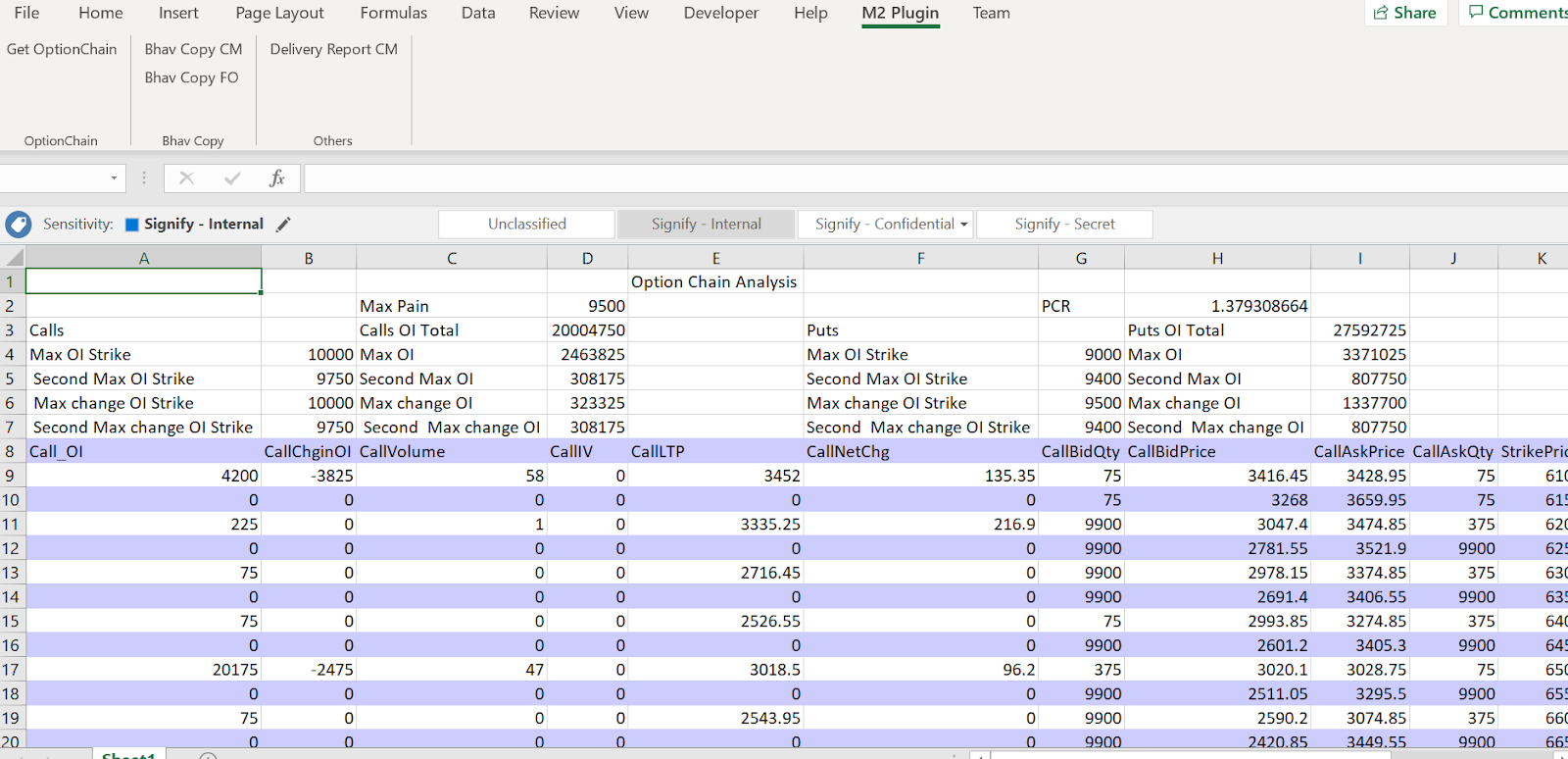
Once you click on ok it will parse the Nse option chain and display in the excel as show in below image.
It will also calcuate max pain, PCR and highest OI at which call & put strike is available.


2) Get Bhav Copy CM
 On click of this button it will display an form which will ask for the date for which bhavcopy is to be downloaded. On selection of correct date it will dowload the bhav copy and display it in excel.
Do remeber for current date bhavcopy is uploaded by exchange after 4:30 PM but many a time they delay in uploading the bhavcopy.


3) Get Bhav Copy FO
 On click of this button it will display an form which will ask for the date for which bhavcopy is to be downloaded. On selection of correct date it will dowload the bhav copy for Futures and display it in excel. It will take a minute or show once it starts displaing in excel as data will be huge.

4) Delivery Report CM
On Click of this button it will display an form which will ask for the date for which delivery report is to be downloaded. On selection of correct date it will download the delivery report and display it in excel.


Friday, April 24, 2020

NSE Option chain parsing in C#


 This is a very basic tutorial on displaying how to parse nse option chain in C# using html agility  utility.

If you guys are not aware about nse option chain. It is a table structure displaying details about call and put on NSE Index or any NSE FNO stock.

Its most important component is OI and IV for particualr Option. along with Option Price.
it helps you in identifying your trade stratagy either you have a mean reverting stratagy or a trend folow stratagy. It will help you in identifying it and also help you in predicting stoploss levels.

Through option chain two most calculations people derive is PCR ratio and Max Pain.

PCR Ratio is a ratio of call to put postitions in the market.
Max Pain is the strike price at which sellers or call and put will have the most impact.


So now going to Parsing it with Html Agility pack and displaying it on a Data grid.


  HttpClientHandler handler = new HttpClientHandler();
            handler.AutomaticDecompression = System.Net.DecompressionMethods.GZip | DecompressionMethods.Deflate;

            System.Net.Http.HttpClient client = new System.Net.Http.HttpClient(handler);

            System.Net.Http.HttpRequestMessage requestMessage = new System.Net.Http.HttpRequestMessage();
            requestMessage.RequestUri = new Uri(url);

            requestMessage.Headers.TryAddWithoutValidation("Accept-Encoding", "gzip, deflate, br");

 var responseMessage = client.SendAsync(requestMessage).Result;

                if (responseMessage.IsSuccessStatusCode)
                {
                    var responsetext = responseMessage.Content.ReadAsStringAsync().Result;
                    HtmlAgilityPack.HtmlDocument document = new HtmlAgilityPack.HtmlDocument();
                    document.LoadHtml(responsetext);
                    List<OptionChain> optionChains = new List<OptionChain>();
                    string message = "";

                    HtmlNodeCollection rows = document.DocumentNode.SelectNodes("//table[@id='octable']/tr");

                    for (int i = 0; i < rows.Count - 1; i++)
                    {
                        HtmlNodeCollection columns = rows[i].SelectNodes("td");

                        //for (int j = i; j < columns.Count - 1; j++)
                        {
                            OptionChain chain = new OptionChain();
                            double value = 0;
                            Double.TryParse(columns[1].InnerText, out value);
                            chain.Call_OI = value;
                            value = 0;
                            Double.TryParse(columns[2].InnerText, out value);
                            chain.CallChginOI = value;
                            value = 0;
                            Double.TryParse(columns[3].InnerText, out value);
                            chain.CallVolume = value;
                            value = 0;
                            Double.TryParse(columns[4].InnerText, out value);
                            chain.CallIV = value;
                            value = 0;
                            Double.TryParse(columns[5].InnerText, out value);
                            chain.CallLTP = value;
                            value = 0;
                            Double.TryParse(columns[6].InnerText, out value);
                            chain.CallNetChg = value;
                            value = 0;
                            Double.TryParse(columns[7].InnerText, out value);
                            chain.CallBidQty = value;
                            value = 0;
                            Double.TryParse(columns[8].InnerText, out value);
                            chain.CallBidPrice = value;
                            value = 0;
                            Double.TryParse(columns[9].InnerText, out value);
                            chain.CallAskPrice = value;
                            value = 0;
                            Double.TryParse(columns[10].InnerText, out value);
                            chain.CallAskQty = value;
                            value = 0;
                            Double.TryParse(columns[11].InnerText, out value);
                            chain.StrikePrice = value;
                            value = 0;
                            Double.TryParse(columns[12].InnerText, out value);
                            chain.PutBidQty = value;
                            value = 0;
                            Double.TryParse(columns[13].InnerText, out value);
                            chain.PutBidPrice = value;
                            value = 0;
                            Double.TryParse(columns[14].InnerText, out value);
                            chain.PutAskQty = value;
                            value = 0;
                            Double.TryParse(columns[15].InnerText, out value);
                            chain.PutAskPrice = value;
                            value = 0;
                            Double.TryParse(columns[16].InnerText, out value);
                            chain.PutNetChg = value;
                            value = 0;
                            Double.TryParse(columns[17].InnerText, out value);
                            chain.PutLTP = value;
                            value = 0;
                            Double.TryParse(columns[18].InnerText, out value);
                            chain.PutIV = value;
                            value = 0;
                            Double.TryParse(columns[19].InnerText, out value);
                            chain.PutVolume = value;
                            value = 0;
                            Double.TryParse(columns[20].InnerText, out value);
                            chain.PutChginOI = value;
                            value = 0;
                            Double.TryParse(columns[21].InnerText, out value);
                            chain.Put_OI = value;
                            value = 0;
                            optionChains.Add(chain);
                        }
                    }
                    return optionChains;
                }


So you can see once we have html document received from HttpClient, We converted the response into an htmlagility Htmldocument .
        
         HtmlAgilityPack.HtmlDocument document = new HtmlAgilityPack.HtmlDocument();
         document.LoadHtml(responsetext);

then we just searched for the table object in the document which stores this Option chain data.

         HtmlNodeCollection rows = document.DocumentNode.SelectNodes("//table[@id='octable']/tr");

After this we just iterated over the rows of the table and stored the details in a list object.


Once this data was available with us we done processing to find out PCR & MaxPain for this chain.
and displayed on the form.


Sunday, April 7, 2019

Calculating RSI (Relative Strength Index)


Calculating RSI (Relative Strength Index)

A momentum oscillator indicator which measures speed and change of price movement
RSI is counted between 0 and 100.
Traditionally considered Overbought when above 70 and Oversold when below 30.

Calculation :
RSI = 100 – 100 / (1 + RS)


 RS   = Average Gain of Up Periods  in specified time frame / Average loss of down  Periods during the specified time frame


§  First Average Gain = Sum of Gains over the past  n periods /n
§  First Average Loss = Sum of Losses over the past n periods /n
    • N = number of period for which RSI is being calculated

The second, and subsequent, calculations are based on the prior averages and the current gain loss:
§  Average Gain = [(previous Average Gain) x n + current Gain] / n.
§  Average Loss = [(previous Average Loss) x n + current Loss] / n.


So now lets code it simply in C#  to give rsi value for a particular interval.

public static double Rsi(double[] closePrices)
    {
        var prices = closePrices;

        double sumProfit = 0;
        double sumLoss = 0;
        for (int i = 1; i < closePrices.Length; i++)
        {
            var difference = closePrices[i] - closePrices[i - 1];
            if (difference >= 0)
            {
                sumProfit += difference;
            }
            else
            {
                sumLoss -= difference;
            }
        }

        if (sumProfit == 0) return 0;
        if (Math.Abs(sumLoss) < Tolerance) return 100;

        var relativeStrength = sumProfit / sumLoss;

        return 100.0 - (100.0 / (1 + relativeStrength));
    }


Friday, July 5, 2013

Windows SysInternal Tools every IT Pro should have


Whether you’re an IT Pro or a developer, you’ll find Sysinternals utilities to help you manage, troubleshoot and diagnose your Windows systems and applications. If you have a question about a tool or how to use them, please visit the Sysinternals Forum for answers and help from other users and our moderators

Sysinternals Live

Sysinternals Live is a service that enables you to execute Sysinternals tools directly from the Web without hunting for and manually downloading them. Simply enter a tool’s Sysinternals Live path into Windows Explorer or a command prompt as http://live.sysinternals.com/<toolname> or  \\live.sysinternals.com\tools\<toolname>.
You can view the entire Sysinternals Live tools directory in a browser at http://live.sysinternals.com.

Sysinternals Suite

The Sysinternals Troubleshooting Utilities have been rolled up into a single Suite of tools. This file contains the individual troubleshooting tools and help files. It does not contain non-troubleshooting tools like the BSOD Screen Saver or NotMyFault.
The Suite is a bundling of the following selected Sysinternals Utilities

Sysinternals File and Disk Utilities
AccessChk
This tool shows you the accesses the user or group you specify has to files, Registry keys or Windows services.

AccessEnum
This simple yet powerful security tool shows you who has what access to directories, files and Registry keys on your systems. Use it to find holes in your permissions.

CacheSet
CacheSet is a program that allows you to control the Cache Manager's working set size using functions provided by NT. It's compatible with all versions of NT.

Contig
Wish you could quickly defragment your frequently used files? Use Contig to optimize individual files, or to create new files that are contiguous.

DiskExt
Display volume disk-mappings.

DiskMon
This utility captures all hard disk activity or acts like a software disk activity light in your system tray.

DiskView
Graphical disk sector utility.


Disk Usage (DU)
View disk usage by directory.

EFSDump
View information for encrypted files.

FileMon
This monitoring tool lets you see all file system activity in real-time.

Junction
Create Win2K NTFS symbolic links.

LDMDump
Dump the contents of the Logical Disk Manager"s on-disk database, which describes the partitioning of Windows 2000 Dynamic disks.

MoveFile
Schedule file rename and delete commands for the next reboot. This can be useful for cleaning stubborn or in-use malware files.

NTFSInfo
Use NTFSInfo to see detailed information about NTFS volumes, including the size and location of the Master File Table (MFT) and MFT-zone, as well as the sizes of the NTFS meta-data files.

PageDefrag
Defragment your paging files and Registry hives!

PendMoves
See what files are scheduled for delete or rename the next time the system boots.

Process Monitor
Monitor file system, Registry, process, thread and DLL activity in real-time.

PsFile
See what files are opened remotely.

PsTools
The PsTools suite includes command-line utilities for listing the processes running on local or remote computers, running processes remotely, rebooting computers, dumping event logs, and more.

SDelete
Securely overwrite your sensitive files and cleanse your free space of previously deleted files using this
DoD-compliant secure delete program.

ShareEnum
Scan file shares on your network and view their security settings to close security holes.

Sigcheck
Dump file version information and verify that images on your system are digitally signed.

Streams
Reveal NTFS alternate streams.

Sync
Flush cached data to disk.

VolumeID
Set Volume ID of FAT or NTFS drives.

Sysinternals Networking Utilities

AD Explorer
Active Directory Explorer is an advanced Active Directory (AD) viewer and editor.
AD Insight
AD Insight is an LDAP (Light-weight Directory Access Protocol) real-time monitoring tool aimed at troubleshooting Active Directory client applications.
AdRestore
Undelete Server 2003 Active Directory objects.
PsFile
See what files are opened remotely.
PsTools
The PsTools suite includes command-line utilities for listing the processes running on local or remote computers, running processes remotely, rebooting computers, dumping event logs, and more.
ShareEnum
Scan file shares on your network and view their security settings to close security holes.
TCPView
Active socket command-line viewer.
Whois
See who owns an Internet address.

Sysinternals Process Utilities

Autoruns
See what programs are configured to startup automatically when your system boots and you login. Autoruns also shows you the full list of Registry and file locations where applications can configure auto-start settings.
FileMon
This monitoring tool lets you see all file system activity in real-time.
Handle
This handy command-line utility will show you what files are open by which processes, and much more.
ListDLLs
List all the DLLs that are currently loaded, including where they are loaded and their version numbers. Version 2.0 prints the full path names of loaded modules.
PortMon
Monitor serial and parallel port activity with this advanced monitoring tool. It knows about all standard serial and parallel IOCTLs and even shows you a portion of the data being sent and received. Version 3.x has powerful new UI enhancements and advanced filtering capabilities.
Process Explorer
Find out what files, registry keys and other objects processes have open, which DLLs they have loaded, and more. This uniquely powerful utility will even show you who owns each process.
Process Monitor
Monitor file system, Registry, process, thread and DLL activity in real-time.
PsExec
Execute processes remotely.
PsGetSid
Displays the SID of a computer or a user.
PsKill
Terminate local or remote processes.
PsList
Show information about processes and threads.
PsService
View and control services.
PsSuspend
Suspend and resume processes.
PsTools
The PsTools suite includes command-line utilities for listing the processes running on local or remote computers, running processes remotely, rebooting computers, dumping event logs, and more.
RegMon
This monitoring tool lets you see all Registry activity in real-time.
ShellRunas
Launch programs as a different user via a convenient shell context-menu entry.

Sysinternals Security Utilities

AccessChk
This tool shows you the accesses the user or group you specify has to files, Registry keys or Windows services.
AccessEnum
This simple yet powerful security tool shows you who has what access to directories, files and Registry keys on your systems. Use it to find holes in your permissions.
Autologon
Bypass password screen during logon.
Autoruns
See what programs are configured to startup automatically when your system boots and you login. Autoruns also shows you the full list of Registry and file locations where applications can configure auto-start settings.
LogonSessions
List active logon sessions
NewSID
Learn about the computer SID problem everybody has been talking about and get a free computer SID changer, NewSID.
Process Explorer
Find out what files, registry keys and other objects processes have open, which DLLs they have loaded, and more. This uniquely powerful utility will even show you who owns each process.
PsExec
Execute processes with limited-user rights.
PsLoggedOn
Show users logged on to a system.
PsLogList
Dump event log records.
PsTools
The PsTools suite includes command-line utilities for listing the processes running on local or remote computers, running processes remotely, rebooting computers, dumping event logs, and more.
RootkitRevealer
Scan your system for rootkit-based malware
SDelete
Securely overwrite your sensitive files and cleanse your free space of previously deleted files using this DoD-compliant secure delete program.
ShareEnum
Scan file shares on your network and view their security settings to close security holes.
ShellRunas
Launch programs as a different user via a convenient shell context-menu entry.
Sigcheck
Dump file version information and verify that images on your system are digitally signed.

Sysinternals System Information Utilities

Autoruns
See what programs are configured to startup automatically when your system boots and you login. Autoruns also shows you the full list of Registry and file locations where applications can configure auto-start settings.
ClockRes
View the resolution of the system clock, which is also the maximum timer resolution.
Coreinfo
Coreinfo is a command-line utility that shows you the mapping between logical processors and the physical processor, NUMA node, and socket on which they reside, as well as the cache’s assigned to each logical processor.
Filemon
This monitoring tool lets you see all file system activity in real-time.
Handle
This handy command-line utility will show you what files are open by which processes, and much more.
LiveKd
Use Microsoft kernel debuggers to examine a live system.
LoadOrder
See the order in which devices are loaded on your WinNT/2K system.
LogonSessions
List the active logon sessions on a system.
PendMoves
Enumerate the list of file rename and delete commands that will be executed the next boot.
Process Explorer
Find out what files, registry keys and other objects processes have open, which DLLs they have loaded, and more. This uniquely powerful utility will even show you who owns each process.
Process Monitor
Monitor file system, Registry, process, thread and DLL activity in real-time.
ProcFeatures
This applet reports processor and Windows support for Physical Address Extensions and No Execute buffer overflow protection.
PsInfo
Obtain information about a system.
PsLoggedOn
Show users logged on to a system
PsTools
The PsTools suite includes command-line utilities for listing the processes running on local or remote computers, running processes remotely, rebooting computers, dumping event logs, and more.
RegMon
This monitoring tool lets you see all Registry activity in real-time.
WinObj
The ultimate Object Manager namespace viewer is here.

Sysinternals Miscellaneous Utilities


AD Explorer
Active Directory Explorer is an advanced Active Directory (AD) viewer and editor.
AdRestore
Restore tombstoned Active Directory objects in Server 2003 domains.
Autologon
Bypass password screen during logon.
BgInfo
This fully-configurable program automatically generates desktop backgrounds that include important information about the system including IP addresses, computer name, network adapters, and more.
BlueScreen
This screen saver not only accurately simulates Blue Screens, but simulated reboots as well (complete with CHKDSK), and works on Windows NT 4, Windows 2000, Windows XP, Server 2003 and Windows 9x.
Ctrl2cap
This is a kernel-mode driver that demonstrates keyboard input filtering just above the keyboard class driver in order to turn caps-locks into control keys. Filtering at this level allows conversion and hiding of keys before NT even "sees" them. Ctrl2cap also shows how to use NtDisplayString() to print messages to the initialization blue-screen.
DebugView
Another first from Sysinternals: This program intercepts calls made to DbgPrint by device drivers and OutputDebugString made by Win32 programs. It allows for viewing and recording of debug session output on your local machine or across the Internet without an active debugger.
Desktops
This new utility enables you to create up to four virtual desktops and to use a tray interface or hotkeys to preview what’s on each desktop and easily switch between them.
Hex2dec
Convert hex numbers to decimal and vice versa.
PsLogList
Dump event log records.
PsTools
The PsTools suite includes command-line utilities for listing the processes running on local or remote computers, running processes remotely, rebooting computers, dumping event logs, and more.
RegDelNull
Scan for and delete Registry keys that contain embedded null-characters that are otherwise undeleteable by standard Registry-editing tools.
RegJump
Jump to the registry path you specify in Regedit.
Strings
Search for ANSI and UNICODE strings in binary images.
ZoomIt
Presentation utility for zooming and drawing on the screen.